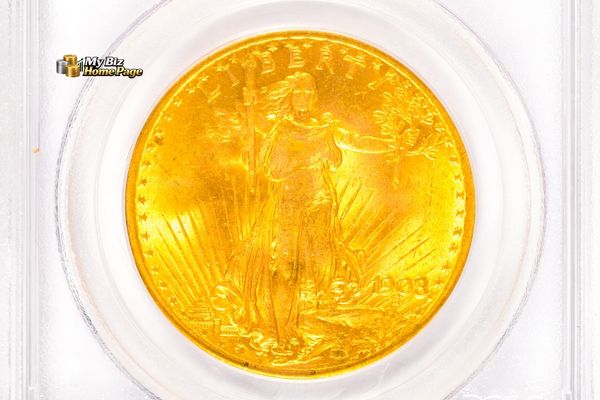
Each year, coin dealers handle more than $2 billion in transactions, connecting collectors, investors, and institutions with everything from ancient Roman denarii to modern gold bullion.
These professionals, known as numismatists, do far more than just buy and sell coins. They appraise estates, authenticate historical rarities, and advise clients on building collections that can appreciate over time.
Understanding the different types of coin dealers and how each one operates can help you make smarter decisions, whether you’re unloading a family collection or investing in precious metals.
Having worked in the industry for more than two decades, I’ve seen how dramatically coin dealing has evolved. From small-town local coin shops to international online platforms, each type of dealer plays a distinct role in the current numismatic market and earns revenue in unique ways.
What Is a Coin Dealer?
Coin dealers are professional numismatists who operate at the intersection of history, finance, and collectibles.
Unlike hobby collectors, who may acquire coins for personal enjoyment or casual investment, coin dealers focus on commercial transactions. Their work involves not just trading coins but also evaluating rarity, grading condition, and verifying authenticity.
Professional Numismatists vs. Hobby Collectors
Numismatics is the study of coins and currency. Professional numismatists use their expertise to authenticate, grade, and appraise coins for resale or investment purposes. Hobby collectors, by contrast, may focus on personal interests such as collecting coins by country, time period, or design.
Dealers often work closely with historians, museums, and grading services to ensure accuracy and authenticity in their inventory.
Core Functions of Coin Dealers
Coin dealers perform several critical functions:
Buying and selling: Acquiring coins from individuals, estates, or other dealers and reselling them for profit.
Appraisal and authentication: Evaluating coins based on condition, rarity, and historical significance.
Grading and certification: Submitting coins to third-party services such as PCGS or NGC for standardized grading.
Investment advice: Helping clients choose between bullion and numismatic coins based on market trends and goals.
Market Scope: From Ancient Coins to Bullion
Coin dealers handle a wide range of inventory, including:
Ancient coins from Greece and Rome.
U.S. rarities such as the 1794 Flowing Hair Dollar.
Modern bullion such as American Gold Eagles or Canadian Maple Leafs.
Medals and tokens used for commemorative or trade purposes.
Local Coin Dealers and Coin Shops
Local coin dealers often operate storefront businesses that serve walk-in customers. These shops are the foundation of the coin market in many communities and offer a personal touch that larger operations can lack.
Walk-in Retail Model
Local coin shops buy and sell coins on a daily basis, dealing with both casual browsers and serious collectors. They may purchase coins for cash or offer trade-in deals. Income is generated through:
Retail markups on coins and bullion.
Buy/sell spreads, especially on bullion.
Small service fees for appraisals or consultations.
Appraisals and Estate Services
Many local coin dealers offer appraisal services, particularly for estates. When someone inherits a coin collection, they often turn to these shops for valuation and potential sale. Dealers make money by:
Purchasing estates below retail value and reselling items individually.
Charging for written appraisals for insurance or probate.
Pros and Challenges
Advantages:
Build trust through face-to-face interaction.
Local reputation and word-of-mouth referrals.
Immediate payment and in-person evaluations.
Challenges:
Limited inventory and customer reach.
High overhead costs for rent and staffing.
Vulnerability to market fluctuations.
Online Coin Dealers
Online coin dealers have rapidly expanded their role in the market by offering convenience, broader selection, and competitive pricing.
E-Commerce and Mail-in Services
Online dealers operate through websites and handle transactions via mail or insured shipping. They often provide:
Digital appraisal services through photos or video.
Online catalogs with real-time pricing.
Mail-in options for sellers.
This model allows dealers to reduce overhead and reach a global customer base.
Logistics and Trust Mechanisms
To build credibility, online coin dealers rely on:
Insured shipping through carriers such as FedEx or USPS.
Partnerships with grading services such as PCGS and NGC.
Transparent return policies and customer reviews.
Revenue Streams and Volume
Online dealers often profit through:
High-volume sales of lower-margin items.
Affiliate and referral programs.
Auction-style listings for rarer items.
Their scalability allows them to move inventory quickly and capitalize on market trends.
Rare Coin Dealers and Numismatic Specialists
Rare coin dealers focus on historically significant and high-value coins. These professionals often operate at the highest levels of the market.
Specialization in Numismatics
Specialists target coins such as:
The 1794 Flowing Hair Dollar.
The 1787 Brasher Doubloon, which sold for $9.36 million.
Their clientele includes museums, wealthy collectors, and institutional investors.
Authentication, Grading, and Provenance
These dealers add value by:
Conducting deep historical research on coins.
Submitting items for third-party grading.
Verifying provenance, or chain of ownership.
High-Ticket Sales and Consignment
Most revenue comes from:
Individual high-value sales.
Commission-based consignments.
Private treaty sales arranged directly between buyer and seller.
Bullion Dealers
Bullion dealers differ from rare coin specialists by focusing on the intrinsic metal value of coins and bars.
Precious Metal Focus
These dealers handle items such as:
Gold and silver bars.
Modern bullion coins (e.g., American Silver Eagle, Canadian Gold Maple Leaf).
Platinum and palladium products.
Their primary buyers are investors looking for a hedge against inflation or market volatility.
Spot Price and Market Timing
Bullion prices fluctuate constantly. Dealers make money on:
Buy/sell spreads based on spot prices.
Premiums over melt value.
Hedging strategies to lock in margins.
Bullion vs. Rare Coins
Bullion:
Lower profit per item.
Higher volume.
Price based on metal content.
Rare Coins:
Higher profit margins.
Specialized knowledge required.
Price based on rarity and condition.
Wholesale Coin Dealers
Wholesale coin dealers operate behind the scenes, supplying inventory to local shops and online retailers.
B2B Transactions and Dealer Networks
These dealers work primarily with other professionals. They maintain relationships with:
Retail coin shops.
Online platforms.
Auction houses.
Inventory Management and Arbitrage
Profit is made through:
Buying in bulk at discounted rates.
Fast turnover of inventory.
Arbitrage between different markets or regions.
Coin Auction Houses
Coin auction houses are integral to the high-end coin market, offering a platform for rare and valuable pieces.
Consignment and Commission Structures
Auction houses make money by:
Charging a seller’s commission (often 10–20%).
Adding a buyer’s premium to the final sale price.
Authenticity and Marketing
Auction houses provide:
Grading and authentication services.
Professional photography and catalog descriptions.
Global marketing to attract bidders.
Record-Breaking Sales
Notable examples include:
The $7.4 million sale of the Brasher Doubloon.
The 1794 Flowing Hair Dollar exposure in 2004.
What Makes a Dealer Reputable?
Whether buying or selling, working with reputable coin dealers is critical for a secure and fair transaction.
Certifications and Memberships
Look for affiliations with organizations such as:
American Numismatic Association (ANA).
Professional Numismatists Guild (PNG).
International Association of Professional Numismatists (IAPN).
Use of grading services such as PCGS and NGC also signals professionalism.
Transparency and Customer Service
Trustworthy dealers:
Offer clear pricing and documentation.
Provide grading guarantees.
Build relationships through honesty and repeat business.
Red Flags To Be Aware Of
Avoid dealers who:
Refuse to provide credentials.
Offer vague or inflated appraisals.
Pressure you into quick decisions.
Choosing the Right Dealer for Your Needs
Coin dealers come in many forms, each with a unique business model based on inventory, clientele, and services.
Local coin dealers offer personal service and community trust, while online coin dealers provide convenience and global access. Rare coin dealers and bullion dealers cater to different segments of the market, one focused on history and rarity and the other on metal value and investment.
Wholesale coin dealers operate behind the scenes, and coin auction houses bring high-end pieces to a broad audience through competitive bidding.
Understanding these distinctions allows you to choose the right partner for your collecting or investing goals. Whether you’re a seasoned numismatist or have just inherited a collection, working with reputable coin dealers who are transparent and certified can make all the difference.
With over $3 billion changing hands each year, the rare coin market has quietly become one of the most active and complex segments of the collectibles and alternative investment world.
This booming industry draws in collectors, investors, and dealers alike, all trading coins prized not just for their metal content, but for their rarity, condition, and historical value.
What makes the rare coin market so unique is its structure: a tightly woven network of sellers, expert dealers, grading services, and auction houses working together to determine how much a coin is worth and how it changes hands.
Whether you’re looking to sell a rare coin from an inherited collection or are curious about how rare coin dealers operate behind the scenes, understanding this system gives you a significant edge to making informed decisions.
In this article, I’ll walk you through how the rare coin industry really works: what happens from the moment someone decides to part with a coin to the point that it’s sold in the open market.
Understanding the Rare Coin Market
The rare coin market is a sophisticated ecosystem built around the buying, selling, grading, and collecting of numismatic coins. These coins are valued not for their metal content, like bullion, but for their rarity, condition, and historical importance.
What Is the Rare Coin Market?
Rare coins are typically those with limited mintage, historical significance, or exceptional condition. This includes early U.S. coins such as the 1794 Flowing Hair Dollar, world rarities such as the 1928 Pattern “Mukden Tiger” Dollar, and even modern mint errors or low-population proof coins.
These coins differ from bullion coins, which are primarily traded for their metal value.
The market is driven by numismatics, which is the study and collection of currency, and includes both hobbyists and investors. Unlike stocks or real estate, rare coins are tangible assets, often passed down through generations or acquired for their potential to appreciate in value over time.
Market Size and Players
The U.S. rare coin market is estimated to exceed $3 billion annually, supported by over 5,000 active coin companies. Major players include:
Heritage Auctions: The largest rare coin auction house, generating more than $500 million in annual sales.
Rare Coin Wholesalers (RCW): A California-based firm that has handled over $2 billion in transactions and frequently deals in high-end coins.
Professional Numismatic Guild (PNG): An elite network of around 300 vetted dealers.
These companies are supported by PCGS and NGC grading services, which provide authentication and certification that help establish market trust.
Why People Buy and Sell Rare Coins
People enter the rare coin market for several reasons:
Collecting: Many enjoy the historical and artistic aspects of coins.
Investing: Coins are seen as a hedge against inflation and a way to diversify portfolios.
Wealth preservation: Tangible assets such as coins can retain or increase in value during economic uncertainty.
The market has grown significantly since the 2008 financial crisis as investors searched for alternatives to traditional assets.
From Collector to Seller: When and Why People Sell Rare Coins
Common Reasons To Sell a Rare Coin
People sell rare coins for a variety of reasons:
Life events: Retirement, inheritance, or financial hardship may prompt a sale.
Market timing: Sellers may act when gold or silver prices rise or when demand for a specific coin increases.
Estate liquidation: Families often need to liquidate inherited collections.
Reinvestment: Some collectors sell coins to upgrade their collections or shift focus.
Emotional attachment can make the decision to sell difficult, especially with coins passed through generations.
Preparing To Sell: What Sellers Should Know
Before selling rare coins, it’s important to understand their value. Key steps include:
Know the grade: Coin condition significantly impacts value. A coin graded MS-65 can be worth twice as much as the same coin graded MS-63.
Understand provenance: A coin’s previous ownership history can add value, especially if it belonged to a notable collection.
Check population reports: Services such as PCGS and NGC publish how many coins exist at each grade level, which helps you understand true rarity.
Common Venues When Selling Rare Coins
Sellers have multiple options:
Local coin shops: Convenient but may offer less competitive pricing.
Online marketplaces: Platforms such as eBay provide reach but carry risks including fraud and inconsistent pricing.
Rare coin dealers: Experts who can appraise, grade, and connect sellers with buyers.
Each option has trade-offs in terms of price, speed, and transparency.
Buy and sell coins: Dealers maintain inventories and may buy directly from collectors.
Appraise: They assess value based on condition, rarity, and market trends.
Educate: Skilled dealers help clients understand grading, pricing, and market timing.
Some firms offer both retail and wholesale services and often handle coins worth millions.
How Dealers Assess Coins
Dealers evaluate coins using:
Grading: A coin’s Sheldon Scale grade (from 1 to 70) is a major value driver.
Auction history: Recent sales of comparable coins help determine fair market value.
Population data: Rarity is confirmed through grading service databases.
Experienced dealers rely on years of market knowledge and relationships with top-tier grading services.
Dealer Networks and Market Access
Seasoned dealers have access to:
Grading services: PCGS and NGC offer priority service to frequent submitters.
Auction houses: Dealers often consign coins to major auctions for global exposure.
Private buyers: High-net-worth collectors often work exclusively with trusted dealers.
These networks help sellers achieve better pricing and faster liquidity.
The Importance of Coin Grading and Certification
How Coins Are Graded
Coins are graded using the Sheldon Scale, which ranges from 1 (Poor) to 70 (Perfect Mint State). Certified grading services such as PCGS and NGC examine coins under magnification and encapsulate them in tamper-evident holders.
MS-65: Gem quality, strong luster, minimal marks.
Proof 70: Flawless proof coin, often with cameo contrast.
Grading Tiers and Quality Labels
Tier
Services
Characteristics
Top
PCGS, NGC
Preferred by investors, strict standards, population reports
Mid
ANACS, ICG
Reliable, but less market premium
Lower
ACG, others
Limited market acceptance
Additional designations include:
CAC stickers: Green or gold stickers that verify a coin is high-end for its grade.
Star (★): NGC’s label for exceptional eye appeal.
When To Grade a Coin
You should grade a coin if it is:
High-value or rare.
Likely to benefit from certification in resale.
Being sold through an auction or dealer.
Grading fees vary, so the expected premium should outweigh the cost.
Selling Rare Coins Through Auctions and Marketplaces
Auction Houses and Online Platforms
Top auction houses include:
Heritage Auctions: Known for record-breaking sales such as the 1794 Flowing Hair Dollar at $7.85 million.
Stack’s Bowers: Specializes in U.S. and world coins.
GreatCollections: Offers online bidding with professional grading.
Digital platforms such as eBay and Whatnot are gaining traction, especially with younger collectors.
How Auctions Work
Consignment: Seller contracts with the auction house.
Promotion: The coin is professionally photographed and marketed.
Sale completion: Winning bidder pays, and seller receives proceeds minus fees.
Auctions offer global reach and liquidity but take time and involve commission fees.
Pros and Cons of Selling Online
Pros:
Broader audience
Faster transactions
Lower fees (in some cases)
Cons:
Risk of counterfeit buyers/sellers
Variable pricing
No guarantee of sale
Proper descriptions and third-party grading help mitigate risks.
What Drives Value in the Rare Coin Market
Rarity, Condition, and Provenance
Rarity: Low mintage or survival rates increase value.
Condition: Higher grades command higher prices. An MS-65 coin can be worth thousands more than an MS-63.
Provenance: Coins from collections like Contursi or Eliasberg often carry premiums due to historical ownership.
Eye Appeal and Market Demand
Collectors look for:
Color and toning.
Strike quality.
Collector interest.
The saying “buy the coin, not the slab” reminds buyers to focus on a coin’s appearance, not just its grade.
Timing and Economic Conditions
Economic factors also affect value:
Precious metal prices.
Interest rates.
Market sentiment.
Risks, Scams, and Market Volatility
Fakes, Altered, and Cleaned Coins
Grading services help protect against the following risks by verifying authenticity.
Counterfeits
Cleaned coins
Altered coins
Market Ups and Downs
The market can be volatile:
High-grade coins tend to hold value better.
Common coins fluctuate with demand.
Economic cycles affect supply and buyer interest.
Working With Reputable Experts
To reduce risk:
Choose dealers affiliated with PNG or ANA.
Sell through established auction houses.
Use top-tier grading services.
Reputation matters in this trust-based industry.
Trends and the Future of the Rare Coin Market
Digital Disruption and Live Selling
Platforms such as Whatnot and eBay Live have introduced real-time selling to a younger, tech-savvy audience. Blockchain-based tools are emerging to track provenance, and AI is beginning to assist in grading.
Global Expansion and Collector Demographics
Interest is growing in Asia and Latin America, while online platforms are attracting a younger demographic. This shift is expanding the market beyond traditional U.S. and European buyers.
Investment and Portfolio Diversification
Rare coins are increasingly recognized as alternative investments. High-net-worth individuals are turning to coins for portfolio diversification, drawn by their historical appeal and potential for appreciation.
What You Should Know Before Entering the Market
The rare coin market is a complex but rewarding space. Whether you are thinking about selling rare coins or looking to invest, understanding how coins move through the system helps you make better decisions.
Begin by understanding your coin’s value through grading and provenance.
Dealers serve as expert intermediaries, offering market access and appraisal.
Grading gives credibility and enhances marketability.
Auctions and online platforms provide different paths to liquidity.
Value is driven by condition, rarity, history, and timing.
Risks exist, but working with reputable dealers, graders, and platforms protects your investment.
Before you sell a rare coin or start collecting, take the time to research and consult with experienced professionals. In a market driven by knowledge and trust, being informed is your greatest asset.